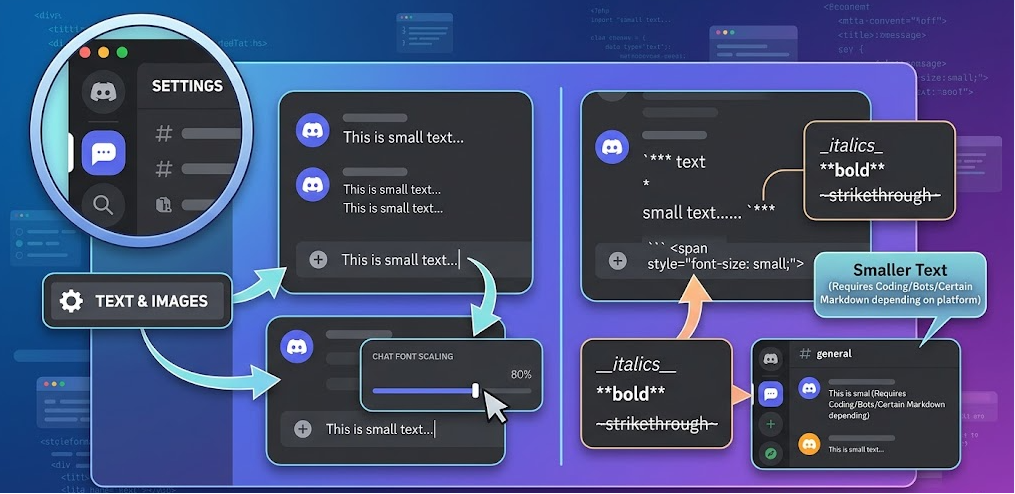

Another popular method people use when searching for how to make text small in Discord is Unicode small text generators. This approach does not rely on Discord settings at all. Instead, it converts normal letters into special Unicode characters that look like miniature versions of standard text. For example, regular words can be transformed into stylized small letters such as “ᵗʰⁱˢ ᵗᵉˣᵗ ʟᴏᴏᴋs sᴍᴀʟʟ.”
This method works by copying text from a generator tool and pasting it directly into Discord chat. The advantage is that it visually creates a strong “small text” effect without needing any commands or formatting syntax. It is widely used in aesthetic profiles, gaming communities, and roleplay servers where users want creative and decorative messaging styles. However, it is important to understand that this is not true formatting; it is just styled characters, which means not all symbols are fully readable or supported in every device or font system.
One drawback of this method is readability. While it looks stylish, long sentences in Unicode small text can be difficult to read quickly. It is best used for short phrases, usernames, or highlights rather than full paragraphs. Despite this limitation, it remains one of the most searched solutions for how to make text small in Discord because it provides a visually unique result that stands out in chat environments.
Using Code Blocks for Cleaner Formatting
Code blocks are another useful way to create a visually different and slightly reduced emphasis effect in Discord messages. While they do not technically make text smaller, they change the appearance of the message by placing it inside a formatted box. This makes the text look more compact and separated from normal chat messages, which is why many users associate it with small text styling.
To use this method, you can wrap your text inside backticks like for inline formatting or use triple backticks for a full block. The result is a monospaced font that appears cleaner and more structured than regular chat text. This is especially useful for sharing notes, instructions, or technical content in gaming and development communities where clarity is important.
The benefit of code blocks is consistency across devices. Unlike Unicode tricks, this method does not break or display incorrectly on different systems. However, it does not actually reduce font size, so it is more about visual separation than true small text creation. Still, many users prefer it when learning how to make text small in Discord because it keeps messages organized and easy to scan in busy chat channels.
Mobile vs Desktop Differences
When exploring how to make text small in Discord, it is important to understand that the experience can slightly differ between mobile and desktop versions. On desktop, formatting changes such as markdown syntax and code blocks are usually displayed more clearly due to larger screen space and better text rendering. This makes small text effects and visual tricks easier to notice.
On mobile devices, however, text scaling and layout compression can affect how small text appears. Some formatting styles may look more compact simply because of the smaller screen size, not because the font has actually changed. This often confuses users who think Discord behaves differently on mobile when in reality the formatting rules remain the same across all platforms.
Despite these differences, both versions support the same core formatting options. Whether you are using Android, iOS, or desktop, methods like small text syntax or Unicode characters will still work. The main difference is only visual presentation, not functionality, which is why understanding platform behavior is key when learning how to make text small in Discord effectively.
Common Mistakes Users Make
Many users trying to figure out how to make text small in Discord often make simple mistakes that lead to confusion or unexpected results. One of the most common errors is assuming Discord has a built-in font size setting for messages. In reality, no such option exists, so users who spend time searching in settings menus usually end up disappointed.
Another mistake is overusing Unicode small text generators for long messages. While they look interesting, they can make text difficult to read and may even appear broken on some devices. This reduces communication clarity, especially in active group chats where quick reading is important. Users also sometimes mix different formatting styles incorrectly, which can lead to messy or unreadable messages.
A final common issue is relying on third-party tools that promise “true small font changes.” Most of these tools do not actually modify Discord’s font system; they only generate styled characters. Understanding these limitations helps users avoid frustration and use more reliable methods like official syntax or code blocks instead.
Safety, Limits, and Best Practices
When learning how to make text small in Discord, it is important to follow safe and effective practices. Discord’s official formatting system is designed to keep messages readable and consistent, so sticking to built-in features is always the safest choice. Using supported syntax like ensures that your messages remain compatible with future updates and all devices.
Users should also be careful when using external text generators. While most are harmless, they can produce inconsistent characters that may not display properly everywhere. This can lead to confusion in group conversations or make important messages harder to understand. For this reason, it is best to use Unicode small text sparingly and only when style matters more than clarity.
A good rule of thumb is to balance creativity with readability. Small text effects are best used for side notes, decorative messages, or emphasis rather than critical information. By following these practices, you can safely use different formatting styles while still maintaining clear communication in Discord communities.
Conclusion
In summary, understanding how to make text small in Discord comes down to knowing that true font resizing is not supported, but several effective alternatives exist. The official syntax provides the closest built-in solution, while Unicode generators and code blocks offer creative and visual variations. Each method serves a different purpose depending on whether you want simplicity, style, or structure in your messages.
Ultimately, the best approach is to choose the method that fits your communication style. For clean and reliable results, the official syntax is ideal, while Unicode text is better for aesthetic expression. By combining these tools wisely, you can improve both the appearance and clarity of your Discord messages.
FAQs
1. Can I actually change font size in Discord?
No, Discord does not allow direct font size changes in messages.
2. What is the easiest way to make small text in Discord?
Using -# your text is the simplest official method.
3. Do Unicode small text generators work everywhere?
Mostly yes, but some devices may display characters differently.
4. Is small text safe to use in Discord?
Yes, as long as you use built-in formatting or trusted generators.
For More UpdateS Visit: viralchronicles